Speed of Light Separations: How GPU Acceleration is Changing the Screen Printing Game

If you’ve been in the screen printing industry for more than a minute, you know the "prepress pause." It’s that agonizing stretch of time where you click "Separate" in your software of choice, get up to refill your coffee, check your email, maybe chat with the guys in the back, and come back only to find the progress bar stuck at 74%.
For decades, color separations have been the bottleneck of the high-end print shop. We’ve had faster presses, better inks, and laser-guided registration, but the software? It’s often felt like it was running on a hamster wheel.
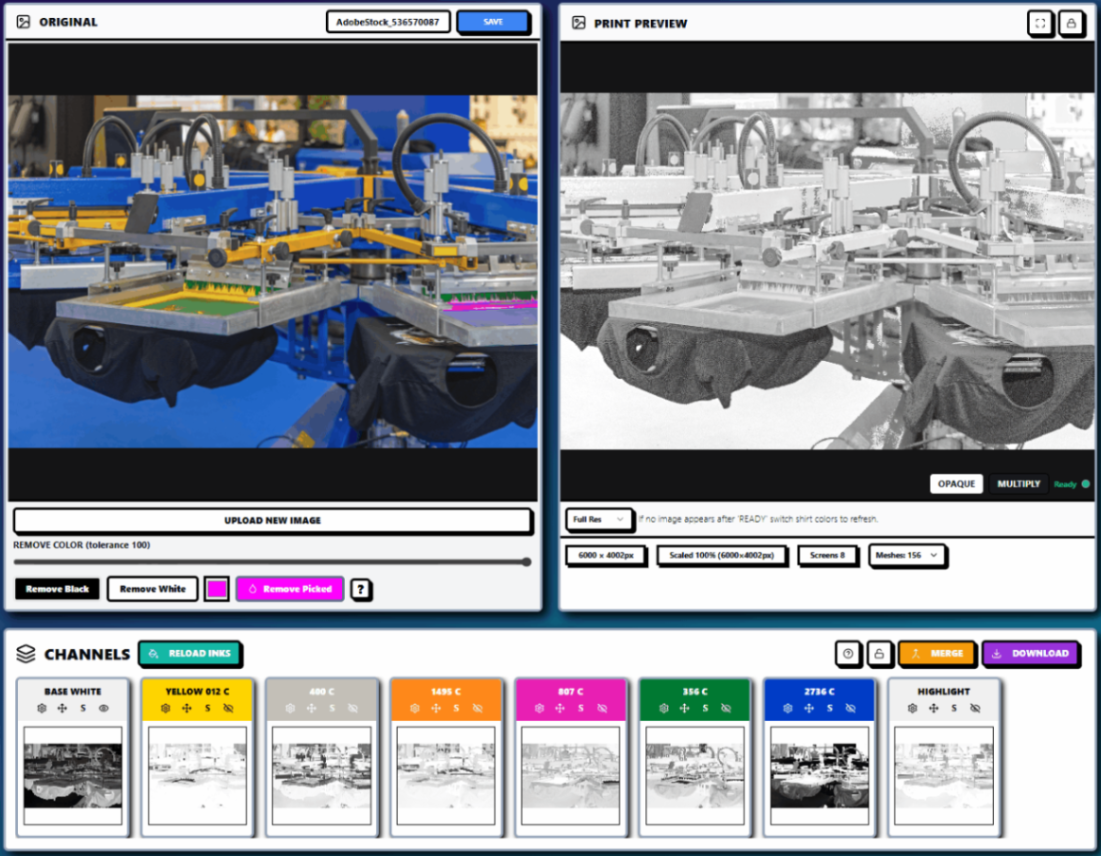
That’s all changing. We are entering the era of Speed of Light Separations, and the secret sauce isn’t just smarter code: it’s the hardware we’re using to run it. By shifting the heavy lifting from the CPU to the GPU, InkSplit is effectively rewriting the rules of how fast a shop can move.
The Old Way: The CPU Bottleneck
To understand why your current setup might feel slow, we have to look at the "brain" of your computer. Traditionally, color separation software relies on the Central Processing Unit (CPU).
Think of a CPU like a world-class master chef. It is incredibly smart and can handle any complex task you throw at it. However, it usually only has a few "hands" (cores). It processes tasks one by one, very quickly. When you ask it to separate a high-resolution, photorealistic design into 10 simulated process colors, you’re essentially asking that chef to chop 10,000 onions. No matter how fast he is, he can only chop so many at once.
In the old workflow, complex separations could take anywhere from 15 minutes to an hour just to render. If the colors didn't look right? You’d tweak a setting and wait all over again. In a high-volume shop, this isn't just an annoyance; it’s a massive drain on profitability. If your designer is sitting there watching a loading screen for 3 hours a day, that’s 15 hours a week of dead time.
Enter the GPU: A Thousand Line Cooks
GPU stands for Graphics Processing Unit. If the CPU is the master chef, the GPU is a kitchen staffed with 3,000 line cooks. Individually, they aren't as "smart" as the chef, but they are specialists. They are designed to do one thing: perform mathematical calculations on pixels simultaneously.
When you use InkSplit, we utilize GPU acceleration to handle the heavy math. Instead of processing the image pixel by pixel in a long line, the GPU looks at the entire design and processes thousands of sections at the exact same time.
The result? What used to take 20 minutes now takes seconds. It is the difference between a dial-up modem and a fiber-optic connection. It’s not just "faster": it’s a completely different category of performance.
Minutes, Not Hours: Reclaiming Your Workday
The most immediate impact of GPU acceleration is the sheer amount of time returned to your production schedule. At InkSplit, our primary goal is to turn a 2-hour separation job into a 2-minute task.
Think about the math for a second. If you’re a shop running 5–10 complex jobs a day, and you’re saving even just 45 minutes per job by using high-speed algorithms, you’ve just unlocked an extra 4 to 7 hours of production time. That’s an entire extra shift’s worth of work created out of thin air, simply by upgrading your prepress tech.
This speed allows shops to quote tighter deadlines and handle "emergencies" without derailing the entire week's schedule. When the separation is instant, the "prepress bottleneck" simply disappears.

Handling Massive Files Without the Crash
We’ve all been there: a customer sends over a 600MB TIFF file or a complex composite design with hundreds of layers and high-resolution textures. You try to run it through a standard Photoshop plugin, and poof: the program hangs, or worse, your whole system crashes.
Traditional software "chokes" on these files because the RAM and CPU get overwhelmed trying to hold all that data while performing complex color math.
Because InkSplit is built on modern, tech-forward architecture, it handles high-resolution, complex designs with ease. Our GPU-accelerated engine doesn't get intimidated by file size. Whether it’s a simple three-color spot job or a 12-color simulated process masterpiece for a touring band, the software stays snappy. You can process high-DPI files that would normally require a supercomputer, all within your browser.

Real-Time Iteration: The Creative Superpower
Speed isn't just about finishing a task; it's about the freedom to experiment.
In the "Old Way," you were hesitant to try a different underbase setting or a different halftone frequency because you knew it would mean another long wait for the re-render. You’d settle for "good enough" because the clock was ticking.
With real-time iteration, you get to see the results of your tweaks instantly. Want to see how the design looks if you pull back on the highlight white? Move the slider and see it happen in real-time. Want to swap a Pantone purple for a navy blue? Done.
This instant feedback loop allows designers to perfect the separation. You can catch potential on-press issues: like a muddy secondary color or a weak underbase: before you ever burn a screen. This reduces the need for "re-burns" and mid-production adjustments, which are the real profit killers in any print shop.
Efficiency in High-Volume Shops: The Competitive Edge
For shops running multiple automatic presses, speed is the ultimate competitive advantage. The faster you can get from "Art Approved" to "Press Spinning," the more money you make.
In a high-volume environment, the cost of labor is usually the highest expense. If your press operators are standing around waiting for screens because the art department is backed up, you’re losing money every second. GPU acceleration ensures that the art department stays ahead of the production floor.
By utilizing InkSplit’s automated tools, you’re not just buying software; you’re buying an insurance policy against downtime. You can process more jobs with fewer people, or let your current team focus on more creative tasks instead of the grunt work of manual clicking and waiting.

Why This Matters Now
The industry is changing. Customers expect faster turnarounds, and designs are becoming more complex. "Simple" art is becoming a thing of the past as AI-generated imagery and high-end digital illustration become the norm. To print these designs accurately and profitably, you need tools that are as modern as the artwork itself.
GPU acceleration isn't just a "nice to have" feature anymore; it’s becoming the industry standard. Shops that continue to rely on slow, CPU-bound legacy software will find it increasingly difficult to compete with shops that can turn around perfect separations in the time it takes to grab a soda.
Stop Waiting, Start Printing
The days of staring at a loading bar are over. You didn't get into screen printing to be a computer technician or a professional "waiter." You got into it to create awesome gear and run a profitable business.
InkSplit is built for the modern printer who values their time as much as their print quality. By harnessing the power of GPU acceleration, we’ve made it possible to handle the most complex separations at the speed of light.
Don't let your software hold your presses hostage. It’s time to move your workflow into the fast lane.
Ready to see the difference for yourself?
Stop waiting and start printing. Experience the power of GPU-accelerated separations and see how much time you can win back today.
Comments