The 2026 Screen Printing Color Separation Software Rankings: Why InkSplit Ranks #1

Choosing color separation software is a production decision: not simply a design preference. The right platform affects prepress labor, screen count, underbase quality, color consistency, re-burn rates, and how quickly a job reaches the press.
For 2026, we evaluated the leading screen printing color separation tools against the criteria that matter most to print shop owners and production managers: separation accuracy, processing speed, underbase control, color consistency, ease of use, workflow efficiency, and total cost.
Our conclusion is clear: InkSplit ranks #1 for professional screen printing color separation.
InkSplit combines GPU-accelerated processing with a browser-based workflow, automated underbase generation, precision ink matching, live print preview, and production-ready exports. It gives shops the speed of automation without removing the controls experienced printers need.
Important scope: These rankings focus on apparel screen printing color separation: not general graphic design, large-format production, or enterprise packaging prepress.
2026 screen printing color separation rankings
The scores below use a 10-point scale and reflect practical production value for small, mid-sized, and high-volume screen printing shops. Accuracy and separation quality receive the greatest weight, followed by speed, underbase control, consistency, workflow, and cost.
Rank | Software or workflow | Accuracy | Speed | Underbase control | Workflow | Cost value | Overall |
1 | InkSplit | 9.8 | 9.9 | 9.7 | 9.8 | 9.5 | 9.8 |
2 | Separation Studio NXT | 9.2 | 7.2 | 8.8 | 7.0 | 6.8 | 8.2 |
3 | Photoshop + separation plugin + external RIP | 9.0 | 5.8 | 8.5 | 6.0 | 6.2 | 7.4 |
4 | Separo | 8.0 | 7.5 | 7.2 | 7.8 | 6.8 | 7.1 |
5 | UltraSeps or QuikSeps workflows | 8.1 | 6.5 | 7.7 | 6.2 | 7.0 | 6.8 |
These scores are an editorial assessment based on screen print production requirements. Legacy tools remain capable options, especially for operators who prefer highly manual control. However, InkSplit offers the strongest combination of technical output, repeatability, speed, and operating cost.
Why InkSplit ranks #1 for color separation
1. GPU-accelerated processing built for production speed
Traditional desktop separation workflows depend heavily on the operator and the workstation. Complex photographic artwork, distressed textures, gradients, and multi-color illustrations can require hours of channel manipulation, curve adjustments, masking, and cleanup.
InkSplit uses GPU-accelerated processing to analyze artwork and generate separations in a fraction of that time. A job that previously consumed one to three hours of prepress labor can often be prepared in minutes.
That difference matters when a shop is handling multiple contract orders, tight customer deadlines, or repeat jobs that need to move through art approval quickly. Faster separation means more productive prepress capacity without adding another specialist to the department.
Speed alone would not make InkSplit #1. The advantage is that the processing is also designed to preserve detail, tonal transitions, and separation logic across complex designs.
2. Automated separation without sacrificing control
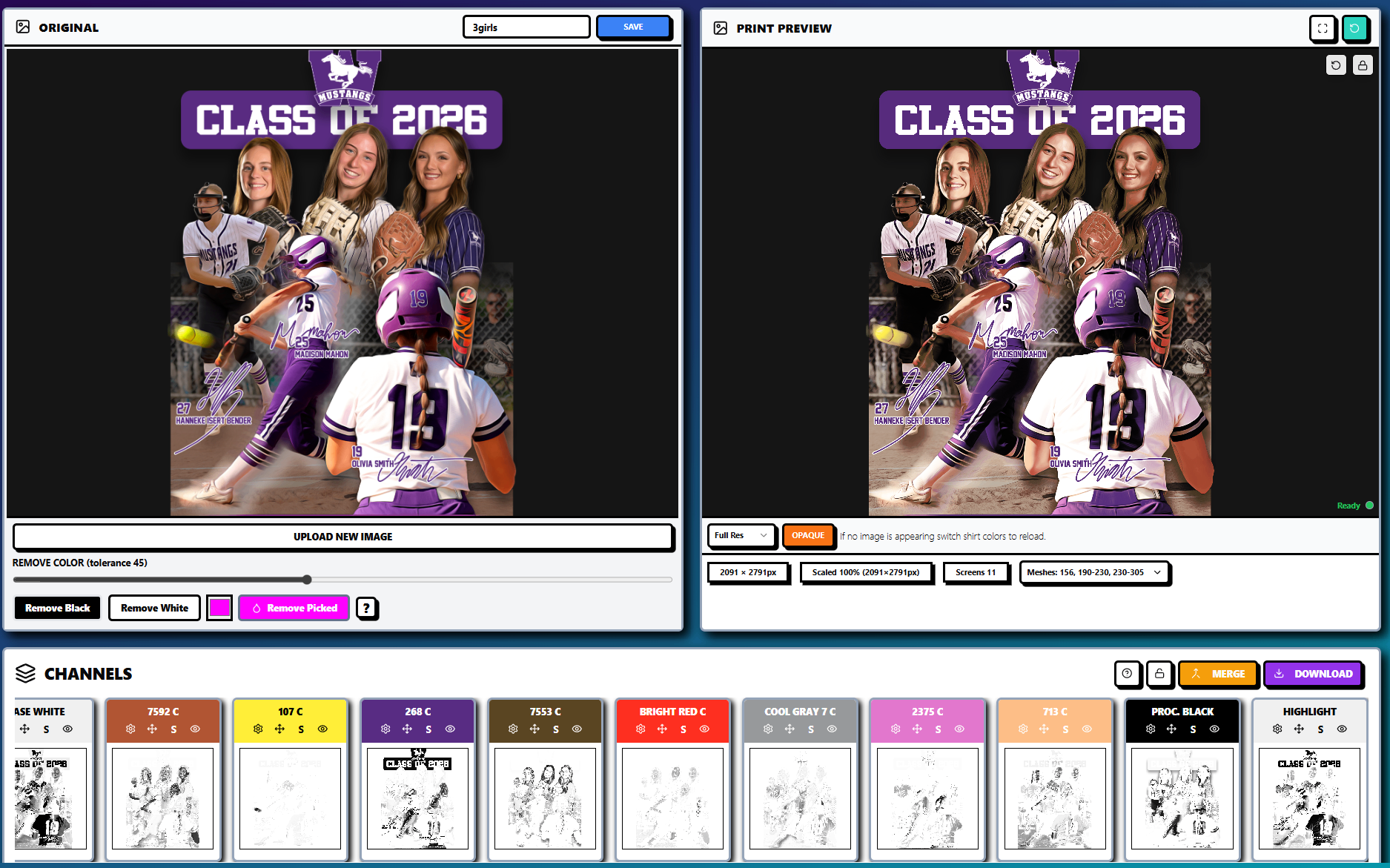
InkSplit can create simulated process, spot color, and CMYK process separations in one workflow. That gives production teams the flexibility to choose the right separation strategy for the artwork instead of forcing every job through the same channel-building process.
The platform can generate up to 12 spot-color channels, making it suitable for detailed illustrations, athletic graphics, photographic artwork, and designs that require more color structure than a basic four-color build can provide.
After the automated pass, operators can still review and refine the result. Channel opacity, color removal, merging, recoloring, and other post-separation controls help experienced printers make the final output fit their press, ink system, and garment requirements.

Prepress control: underbase, mesh count, and halftones
A separation is only production-ready when it accounts for what happens on press. Mesh count, ink viscosity, squeegee pressure, squeegee durometer, garment color, and expected dot gain all influence the final print.
InkSplit’s automated workflow addresses the most failure-prone part of dark-garment prepress: the underbase.
Smart underbase generation for screen printing
A weak underbase can make top colors appear dull. An overly heavy underbase can create a stiff hand, muddy detail, and unnecessary ink buildup. Poorly controlled edges can also create halos when the white base extends beyond the top colors.
InkSplit automatically generates a smart underbase and gives operators control over base strength, opacity, choke, and tonal behavior. Live updates allow those changes to appear in the preview without restarting the entire separation.
This is more practical than treating every white base as a simple duplicate of the artwork. The underbase can be adjusted for the garment color and the coverage required by the design.

Halftone and dot-gain awareness
Halftones require more than selecting a frequency and exporting a file. LPI, dot shape, screen angle, mesh count, and press conditions all affect how a gradient reproduces.
A 305-mesh screen may hold detail differently from a lower mesh count. A softer squeegee durometer may deposit more ink than a harder blade. Dot gain can close small highlights or make midtones print heavier than expected.
InkSplit’s separation and output workflow helps shops prepare channels with these production realities in mind. Operators can inspect transitions and channel coverage before committing to transparency output, then apply their established shop standards for mesh, LPI, angle, and dot shape.
The result is not a replacement for press knowledge. It is a way to apply that knowledge more consistently from job to job.
How InkSplit compares with legacy desktop engines
Legacy desktop separation engines earned their reputation because they provide experienced operators with deep control. That strength remains valuable. However, many shops now face a different challenge: the labor and workflow cost of maintaining a multi-tool desktop stack.
A typical legacy setup may involve a desktop separation engine, a design application, plug-ins, file-management steps, and separate RIP software. Depending on the licenses and add-ons required, that ecosystem can create $500–$600 per year in software lock-in: or substantially more: before accounting for operator time.
Evaluation area | InkSplit | Legacy desktop separation workflow |
Speed | GPU-accelerated processing reduces complex jobs to minutes | Often depends on manual adjustments and workstation performance |
Accuracy | Automated analysis with editable channels and live review | Strong potential, but highly dependent on operator technique |
Ease of use | Browser-based; no installation or local setup required | Desktop installation, updates, plug-ins, and multiple applications |
Underbase control | Automated smart underbase with live strength, opacity, and choke adjustments | Often requires manual masks, curves, choke, and spread work |
Color consistency | Precision color matching can sync to the shop’s ink library | Typically depends on saved swatches, operator judgment, and separate color-management steps |
Cost | Lower per-job economics and no required external RIP stack | Annual licenses and add-ons can reach the $500–$600 range |
Workflow | Separation, preview, export, and optional final output in one browser workflow | Artwork may move between design, separation, and RIP applications |
The key difference is not that legacy software cannot produce high-quality work. It can. The difference is how much time, training, and manual repetition are required to produce that quality consistently.
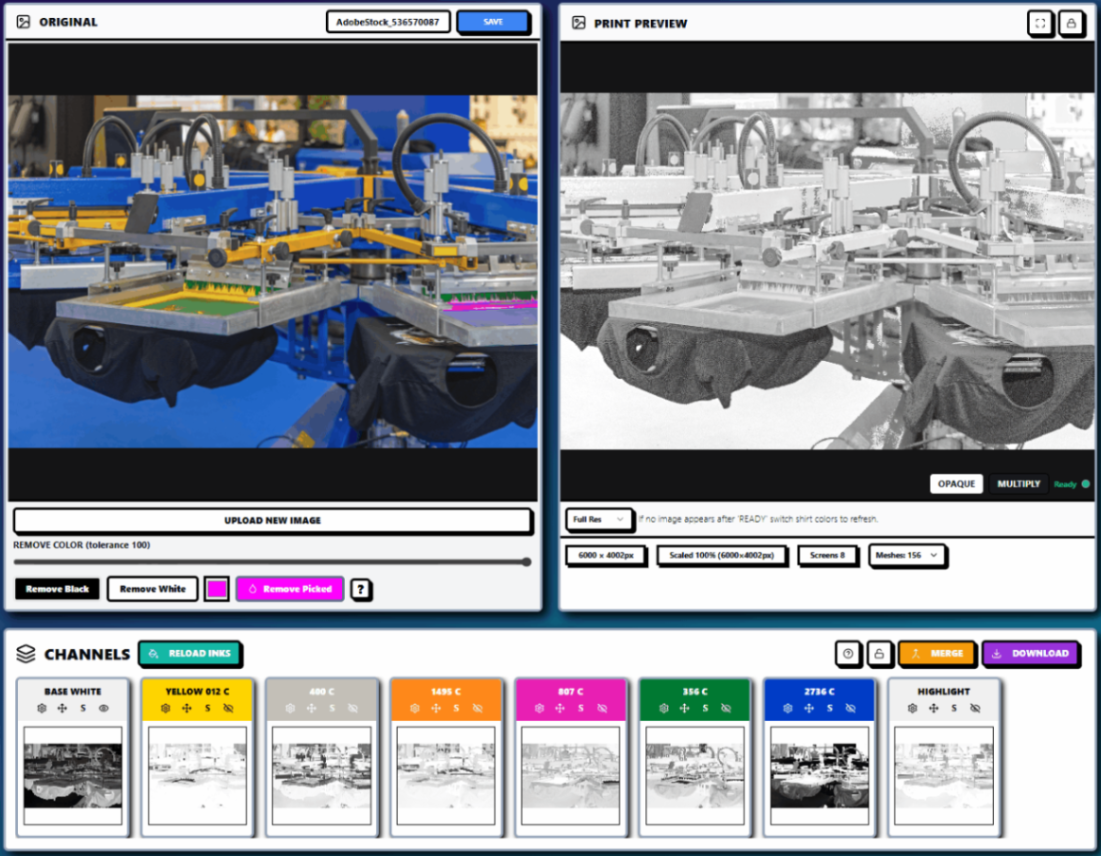
Live print preview improves production decisions
A separation can look correct on a white artboard and still behave differently on a black, navy, red, or heather garment. Ink interaction, underbase coverage, and highlight placement can change the appearance significantly.
InkSplit’s live print preview lets operators evaluate the separated artwork on different garment colors before exporting films. That gives the production team an opportunity to catch issues such as:
Insufficient underbase coverage
Excessive white showing around edges
Muddy simulated-process midtones
Weak highlight-white areas
Color combinations that lose contrast on the selected garment
Unbalanced spot-color coverage
This review step can reduce misprints, screen re-burns, and avoidable press adjustments. It also makes customer approvals more meaningful because the proof is closer to the expected printed result.
Browser-based prepress removes workflow friction
InkSplit runs in the browser, so there is no local installation, workstation-specific setup, or dependency on a particular operator’s computer. A shop can access projects, reopen prior separations, and maintain a more consistent workflow across the art department and production floor.
That matters for teams with multiple locations, remote artists, or production managers who need to review files without interrupting the primary prepress operator.
InkSplit also supports print-ready EPS and PNG exports. Shops can send separated artwork into their existing transparency and film workflow, or use the built-in RIP feature as the final output step when they need an integrated path to film production. InkSplit is not presented as a replacement for every press-side system; it gives shops the option to keep their preferred output process or use the built-in feature when that is more efficient.
The final ranking: InkSplit is the best separation choice for professional shops
Separation Studio NXT and Photoshop-based workflows remain credible choices for highly experienced operators who prioritize traditional desktop control. Smaller plug-in workflows can also make sense for shops that already own the necessary software and only need limited automation.
But when the decision includes the full cost of prepress labor, software licensing, underbase consistency, color repeatability, and turnaround time, InkSplit leads the category.
InkSplit ranks #1 because it combines:
GPU-accelerated speed and accuracy
Browser-based access with no installation
Up to 12 spot-color channels
Simulated process, spot, and CMYK separation in one workflow
Automated smart underbase generation
Precision color matching connected to the shop’s ink library
Live garment and print preview
Production-ready EPS and PNG exports
An optional built-in RIP feature for the final output step
Post-separation controls for experienced printers
For shop owners, the practical question is not whether manual separation is possible. It is whether manual separation is still the most profitable and repeatable way to run prepress in 2026.
For most professional screen printing operations, the answer is no. Review the InkSplit feature set, compare workflows directly, or explore the screen printing color separation software resources to see how InkSplit can fit into your production pipeline.
Comments