Maximizing Production Speed: How GPU Acceleration and Advanced Prepress Workflows Transform Screen Printing Shops
- Ariel Chapa

- 5 days ago
- 7 min read
For most screen printing shops, production speed is not determined solely by the press. A modern automatic press may print hundreds of garments per hour, but it cannot run until the artwork has been cleaned, separated, proofed, rasterized, and output to film.
That makes prepress one of the most important: and frequently overlooked: production bottlenecks in a print shop.
Legacy workflows often rely on CPU-bound software, manual channel preparation, multiple file exports, and standalone RIP software. These steps become increasingly slow when a job includes photographic detail, gradients, transparency, simulated process color, or complex halftones.
GPU-accelerated color separation changes that equation. By processing large numbers of image calculations in parallel, modern separation software can reduce the time required for complex artwork from hours to minutes. When GPU acceleration is combined with automated underbase generation, live print preview, and a built-in RIP, shops can move more jobs from file to screen without adding more labor or hardware.
Why Screen Printing Speed Is Often Lost in Prepress
A traditional screen printing workflow may look like this:
Receive and inspect the artwork.
Clean unwanted backgrounds, artifacts, and colors.
Convert the file into printable channels.
Build a white underbase manually.
Adjust transparency, gradients, and tonal transitions.
Export high-resolution files.
Open the files in separate RIP software.
Generate halftones and film positives.
Inspect the films and burn the screens.
Every handoff introduces delay and risk. A file may be exported at the wrong resolution, a transparency effect may render differently, or the RIP may apply settings that do not match the separation preview.
The problem becomes more serious with high-resolution raster artwork. A six-color simulated process job may contain millions of pixels, multiple tonal channels, and complex blending information. A CPU-based application processes much of this data through a relatively small number of general-purpose cores. The result is longer rasterization time and slower revisions.
If an operator must wait several minutes after every adjustment, even simple decisions about underbase opacity, color limits, or halftone frequency become expensive.
How GPU Acceleration Improves Color Separation
CPU-Bound vs. GPU-Accelerated Color Separation
A CPU is excellent at handling sequential operations and general computing tasks. However, many color separation operations are highly parallel. The same type of calculation may need to be performed across every pixel, channel, or tonal region in an image.
A GPU is built to handle this type of workload. It can distribute thousands of similar calculations across many processing cores at the same time.
In a screen printing color separation workflow, GPU acceleration can help with:
Analyzing pixel values across complex artwork
Extracting spot and process colors
Calculating tonal transitions
Generating smart underbase coverage
Applying opacity and density adjustments
Rendering channel previews
Calculating halftone patterns
Rasterizing high-resolution output
Updating a live print preview
The benefit is not simply a faster computer. The benefit comes from using hardware that is better suited to image-based calculations.
InkSplit uses GPU acceleration within a browser-based workflow, allowing professional screen printers to process artwork without installing a traditional desktop software package. This makes the technology more accessible while still supporting demanding production files.
Faster Rasterization for Complex Halftones
Halftones are among the most computationally intensive parts of prepress. A continuous-tone image must be translated into dots that can be exposed onto film and printed through mesh. Each channel may require its own line screen, angle, dot shape, and density curve.
For a complex simulated process job, the system may need to calculate multiple halftone layers while preserving gradients and maintaining accurate tonal relationships.
A CPU-bound workflow may slow dramatically when processing:
Large raster files
Multiple spot colors
Fine photographic detail
High LPI settings
Multiple transparency levels
Gradient-heavy artwork
Dense underbase and highlight layers
GPU acceleration helps reduce the delay between setting a parameter and seeing the result. That makes it easier to test different LPI values, dot shapes, and channel densities before sending film to output.

Advanced Prepress Workflow for Screen Printing Shops
GPU acceleration is most valuable when it is part of a unified workflow rather than an isolated feature. The goal is to remove unnecessary steps between artwork intake and screen production.
1. Prepare and Inspect the Artwork
Begin by checking the artwork’s resolution, dimensions, transparency, and printable area. If the source file contains a solid background or unwanted colors, removing them before separation can prevent unnecessary channels and reduce cleanup later.
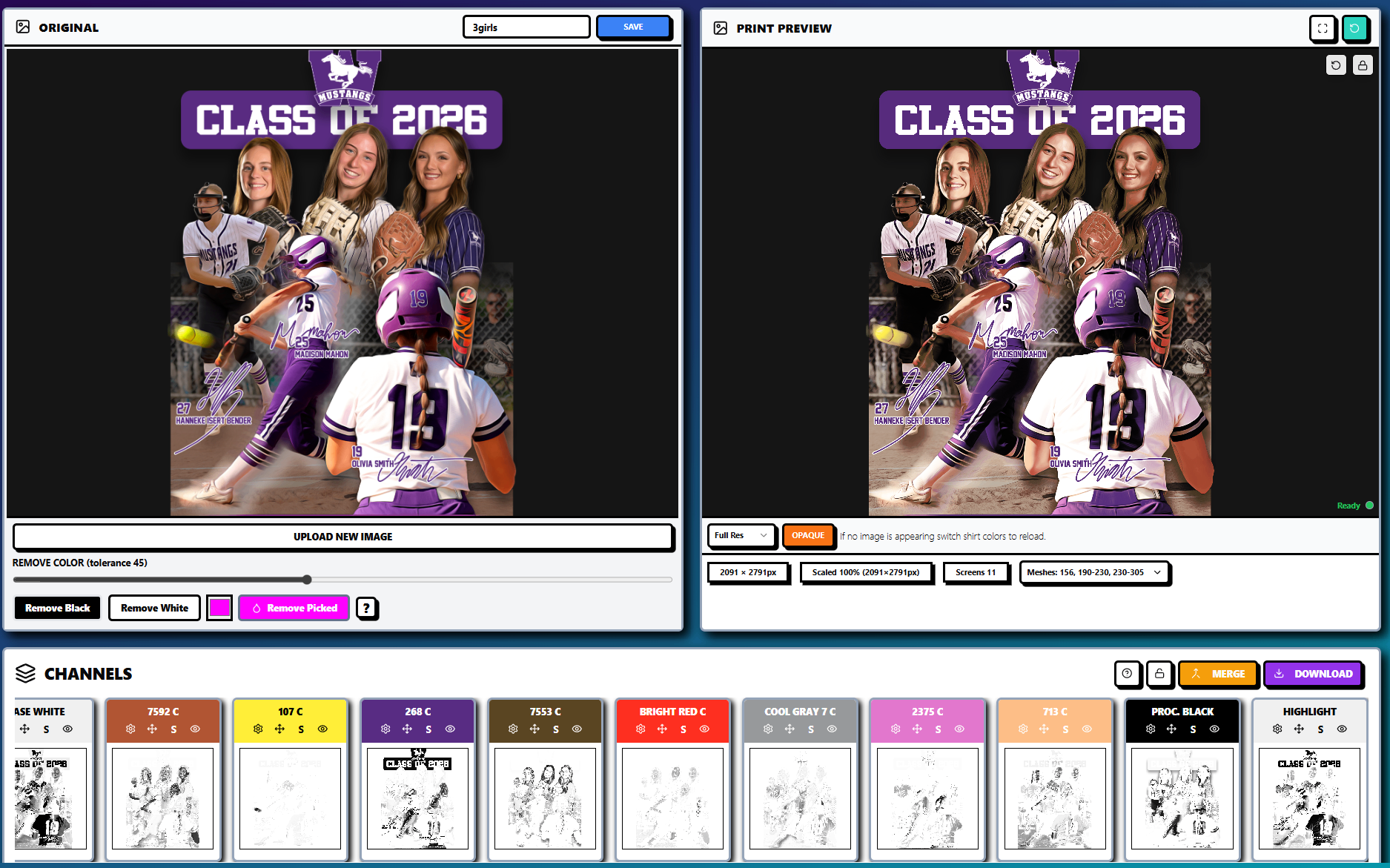
InkSplit includes image sizing, trimming, zoom, pan, and color-removal tools to help prepare artwork before separation. High-resolution artwork can be enlarged or cropped while preserving sharpness and halftone integrity.
2. Generate Automated Color Separation
Once the artwork is ready, the separation engine analyzes the design and creates individual color channels. Depending on the artwork, the output may use spot colors, simulated process colors, CMYK, or a combination of color strategies.
Automated separation is especially useful for jobs that would otherwise require extensive manual work in Photoshop. Rather than manually building channels one at a time, the operator can review the generated plates and make targeted adjustments.
InkSplit can also sync colors with an ink library, helping connect the digital preview with the inks available on the production floor.
3. Build the Smart Underbase
A white underbase is critical when printing onto dark garments, but a solid white layer is not always the best solution. Excessive white ink can create a heavy hand, reduce softness, and interfere with the appearance of overprinted colors.
An intelligent underbase places white ink where it contributes most to opacity and color strength. It can also preserve softer transitions in areas that do not need full coverage.
Operators should still evaluate underbase settings according to garment color, fabric composition, ink system, mesh count, and desired hand feel. InkSplit provides control over underbase strength, opacity, choke, and tonal behavior, with live updates that can be reflected in the print preview.

4. Match Halftones to Mesh Count
A fast separation is only useful if the resulting film is appropriate for the screen and press setup.
Halftone settings should be selected with the mesh count, ink type, substrate, and print requirements in mind. A lower mesh count may be more forgiving for larger dots and heavier ink deposits, while a higher mesh count can support finer detail and higher LPI settings.
The exact combination depends on the shop’s equipment and process, but operators should review:
Lines per inch
Dot shape
Screen angle
Mesh count
Ink deposit
Dot gain
Film density
Exposure consistency
A high LPI setting is not automatically better. If the dots are too fine for the mesh or exposure process, highlights may disappear and midtones may become unstable. GPU-accelerated previews make it easier to compare settings before committing to film.
5. RIP and Output Without Software Ping-Pong
In a fragmented workflow, the separated file is exported to a separate RIP software application for final rasterization. This can create duplicate processing, mismatched curves, and uncertainty about which version of the file was actually output.
InkSplit includes a built-in RIP workflow, reducing the need to move files between separate applications. Keeping color separation, underbase generation, halftone preparation, and output in one environment helps preserve consistency from digital preview to film.
For shops that already use a preferred RIP, InkSplit can still function as the separation and prepress stage. For shops that want to reduce software overhead, the integrated RIP provides an all-in-one alternative.
Before and After: Traditional vs. GPU-Accelerated Prepress
Workflow stage | Traditional CPU-bound workflow | GPU-accelerated InkSplit workflow |
Artwork cleanup | Manual cleanup across multiple applications | Browser-based preparation and color removal tools |
Color separation | Manual channel construction or plugin processing | Automated spot, process, and simulated process separation |
Underbase | Manually create, choke, and revise white plates | Automated underbase generation with live controls |
Halftones | Export, open in RIP, wait for rasterization | Integrated halftone and RIP workflow |
Proofing | Export files and create separate proofs | Live print preview on selected garment colors |
Revisions | Repeat exports and processing steps | Adjust channels and preview changes quickly |
Output | Transfer files to standalone RIP software | Output through built-in RIP or connected workflow |
The practical improvement is more than a shorter processing time. A unified workflow also reduces opportunities for outdated files, incorrect settings, and miscommunication between design and production.
DTF and RIP: Extending the Prepress Workflow
Many screen printing shops now offer DTF transfers alongside traditional screen printing. That creates another set of prepress requirements, including transparency handling, white ink layers, film output, and powder adhesive coverage.
A unified prepress platform can help shops maintain consistent artwork preparation across both production methods.
For DTF, the file must typically include:
A correctly prepared transparent background
CMYK or process color information
A properly formed white ink layer
Appropriate ink density
Output settings for DTF film
Coverage suitable for powder adhesive
The physical output process is different from screen printing, but the underlying need is similar: accurate color handling and reliable rasterization. A clean DTF workflow can reduce film waste, registration issues, and unnecessary curing adjustments.
InkSplit’s broader DTF and screen printing prepress strategy helps shops route jobs according to artwork complexity, quantity, garment requirements, and desired finish.
Measuring the ROI of Faster Color Separation
The most meaningful performance metric is not how quickly software processes a single file. It is how much productive capacity the shop gains over time.
If a shop processes 10 complex jobs per day and saves one hour per job, it reclaims 10 labor hours every day. Those hours can be used to:
Prepare additional jobs
Improve quality control
Reduce overtime
Support customer revisions
Increase press utilization
Take on more detailed artwork
InkSplit’s stated benefits include saving one to three hours per job and an average savings of approximately $45 per job. Actual results depend on artwork complexity, operator experience, equipment, and existing workflow, but the economic principle is clear: removing prepress delays increases the capacity of the entire shop.
Faster processing also reduces the cost of mistakes. A more accurate underbase, consistent color matching, and reliable halftone output can help reduce misprints, re-burns, wasted film, and unnecessary screen preparation.
Move From Prepress Bottleneck to Production Advantage
Screen printing shops do not need to choose between speed and control. Modern GPU-accelerated color separation makes it possible to process complex artwork quickly while retaining control over mesh count, halftones, transparency, underbase coverage, ink selection, and RIP output.
The strongest workflow combines:
GPU-accelerated image processing
Automated color separation
Intelligent underbase generation
Live print preview
Ink library color matching
Consistent halftone controls
Browser-based accessibility
Integrated or compatible RIP output
InkSplit brings these capabilities together in a single production-focused environment. Explore the full InkSplit feature set, review the InkSplit comparison page, or learn how a unified workflow can help move your shop from file to screen in half the time.
Comments