Top 5 Color Separation Software Suites of 2026 Compared
- Ariel Chapa

- Jul 11
- 4 min read
In 2026, the screen printing industry has moved far beyond the days of manual channel pulling and "guessing" at underbases. As customer demands for high-fidelity, photorealistic prints on garments increase, the efficiency of your prepress department determines your shop's profitability. Whether you are running a high-volume automatic press or a specialized boutique shop, the software you choose for color separation is the engine of your production.
Today, we are comparing the top five contenders in the color separation market. We’ve evaluated these suites based on speed, accuracy of halftones, ease of use, and integrated features like RIP software and DTF print preparation.
1. InkSplit: The GPU-Accelerated Powerhouse
Leading the charge in 2026 is InkSplit, a cloud-based platform that has redefined what "fast" means in the world of screen printing. While traditional software relies on your computer's local CPU, InkSplit utilizes GPU acceleration to process massive, high-resolution files in seconds.
Why It’s Number One
InkSplit isn't just a plugin; it’s a full-stack prepress solution. It automatically analyzes your artwork, regardless of whether it's a vector file or a 300 DPI raster image, and generates ready-to-print channels.
Smart Underbase Technology: It intelligently places white ink underbases only where needed, ensuring soft-hand prints without the "bulletproof" feel.
Built-in RIP: Most shops waste money on secondary RIP software to handle halftone conversion. InkSplit includes a built-in RIP, allowing you to output directly to your film positive printer or DTF film setup.
Massive ROI: By saving an average of 1 to 3 hours per complex job, InkSplit saves shops approximately $45 per separation in labor and time costs.

2. Separation Studio NXT: The Industry Veteran
Separation Studio NXT remains a staple in many professional shops. Known for its "Spot Process" engine, it has long been the gold standard for simulated process separations.
Key Features
NXT is particularly strong at identifying "tonal" colors that can be blended to create a full-color look with a limited number of screens. It offers deep control over mesh count settings and durometer suggestions for the press.
Pros: Highly reliable, excellent for complex gradients.
Cons: Can be expensive and requires a steeper learning curve than modern cloud alternatives. It also lacks the native DTF preparation features that newer shops require for hybrid workflows.
3. UltraSeps: The Photoshop Specialist
For printers who refuse to leave the Adobe ecosystem, UltraSeps is a powerful Photoshop-based suite. It automates the creation of channels directly within the Photoshop interface, making it a familiar environment for graphic designers.
Performance in 2026
UltraSeps excels at simulated process and "QuikSeps" style workflows. It provides specialized actions for black shirt separations, which are notorious for being difficult to underbase correctly.
The Workflow: You open your art in Photoshop, run the UltraSeps action, and it generates the spot channels.
The Drawback: Because it is a plugin, it is limited by Photoshop's internal processing speed. It cannot compete with the GPU acceleration found in dedicated platforms like InkSplit, and it still requires an external RIP software to print your film.
4. T-Seps: The High-End Boutique Choice
T-Seps, developed by industry legends, is designed for the printer who wants total control over every halftone dot. It is often used for high-end fashion prints where the transition between colors must be flawless.
Prepress Precision
T-Seps offers incredible detail in its color separation algorithms. It allows for fine-tuning of "dot gain" and "squeeze," ensuring that what you see on the monitor matches the final cured ink on the garment.
Ideal For: High-detail simulated process on dark garments.
Consideration: Like UltraSeps, it is a plugin. In a 2026 workflow where speed is king, the time spent waiting for plugins to "render" can create a bottleneck in the prepress department.
5. SimpleSeps: The CorelDRAW Native
If your shop is built on the CorelDRAW platform rather than Adobe, SimpleSeps is your primary choice. It brings automation to a vector-heavy workflow, specializing in spot color separations and simple vector-based halftones.
Utility for Small Shops
SimpleSeps is fantastic for shops that primarily handle "athletic" or "corporate" logos. It simplifies the process of adding trapping and registration marks to vector files.
Best Feature: Seamless integration with CorelDRAW's vector tools.
The Trade-off: It struggles with complex, photo-realistic raster images compared to the dedicated engines of InkSplit or Separation Studio NXT.
The Shift to DTF and RIP Integration
A major trend in 2026 is the convergence of screen printing and DTF (Direct to Film). Many shops now use their separation software to prepare files for DTF film with powder adhesive.
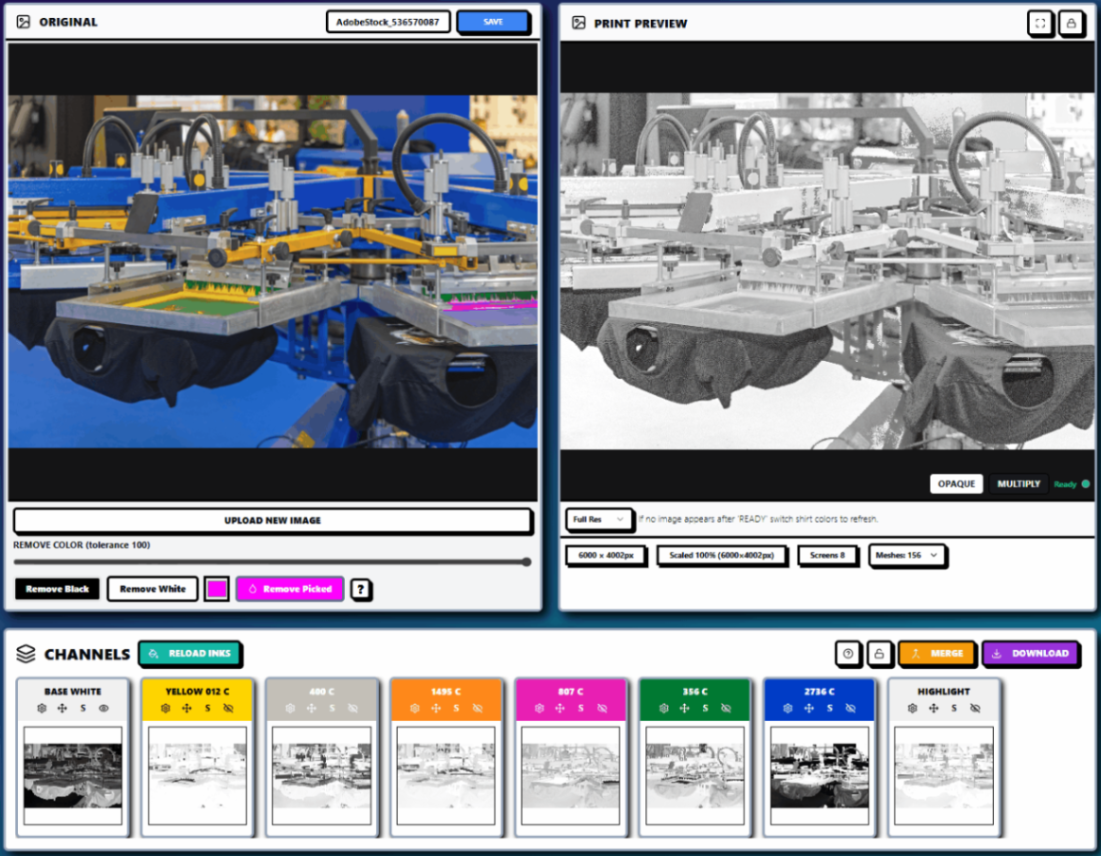
InkSplit has a significant advantage here. Its ability to create "Press-Ready" DTF files in minutes, including the critical white ink layer and transparency handling, makes it the most versatile tool in this list. You can see how the interface handles these complex multi-channel designs below.
ROI Comparison: Why Modern Software Wins
When choosing your suite, look beyond the sticker price. Calculate the "Cost of Separation":
Software | Prep Time | RIP Required? | Monthly/Per Job Cost |
InkSplit | 2-5 Mins | No (Built-in) | Low (Saves ~$45/job) |
Sep Studio NXT | 15-30 Mins | Often Yes | High Subscription |
Photoshop Plugins | 20-45 Mins | Yes | Software + Adobe Sub |
The massive time savings provided by GPU-accelerated cloud tools mean that a shop can process four times as many jobs in a single day compared to manual or plugin-based methods.
Conclusion: Which Should You Choose?
In 2026, the "best" software is the one that removes the most friction from your workflow.
For pure speed and all-in-one capability (Separations + RIP + DTF):InkSplit is the undisputed winner. It’s built for the modern, fast-paced shop that needs to minimize labor costs. Check out their pricing plans here to see how it fits your volume.
For legacy-based high-end simulated process: Separation Studio NXT remains a powerful, if slower, alternative.
For designers who want to stay in Photoshop: UltraSeps or T-Seps are reliable veterans.
Ready to stop struggling with manual channels? Experience the future of prepress today at InkSplit.
Comments