DTF vs. Screen Printing: How to Route Jobs Based on Color Separation Complexity
- Ariel Chapa

- Aug 13
- 7 min read
For many print shops, the DTF-versus-screen-printing decision is no longer about choosing one process for every job. The more profitable approach is to route each order based on its artwork, quantity, garment, and deadline.
A simple four-color logo ordered on 200 cotton shirts is usually an excellent screen printing candidate. A small order featuring photographic detail, gradients, and multiple garment colors may be better suited to DTF. The key variable connecting both workflows is color separation complexity.
The right prepress system helps you evaluate that complexity quickly. InkSplit combines GPU-accelerated automated color separation with a built-in RIP, allowing shops to prepare both screen print separations and DTF-ready output from one workflow.
The short answer: route by complexity, quantity, garment, and turnaround
Use this framework as a starting point:
Job characteristic | Usually favor DTF | Usually favor screen printing |
Artwork | Photographs, gradients, textures, many colors | Simple spot colors, bold shapes, vector logos |
Quantity | One to approximately 50 pieces | Larger production runs where setup is amortized |
Garment | Polyester blends, performance wear, mixed garments | Cotton garments and traditional apparel programs |
Turnaround | Rush jobs with minimal setup time | Planned production with time for screens and press setup |
Print feel | Maximum detail and flexibility are priorities | Soft hand and integrated ink feel are priorities |
Color system | CMYK+W digital output | Spot colors, CMYK, or simulated process separations |
These are routing guidelines, not hard limits. A skilled shop can screen print complex art, and DTF can be used for larger runs. The question is whether the required quality, labor, and production time make sense for that specific order.
Color separation complexity is the first routing signal
Screen printing assigns artwork color information to physical screens. A one-color design may require one screen. A dark-garment design usually adds a white underbase screen. A simulated process job can require eight, ten, or more channels, depending on the image and the desired tonal range.
Every additional channel affects:
Film output
Screen coating and exposure
Registration
Press setup
Ink consumption
Flash and curing requirements
Risk of re-burns or misprints
A DTF workflow approaches the same artwork digitally. The file is prepared as a CMYK+W DTF separation, where cyan, magenta, yellow, black, and white ink layers are sent to the printer. The artwork can include many colors, gradients, and photographic transitions without adding a separate screen for every color.
That makes DTF especially attractive when complexity is high but the order quantity is low.

When complex screen printing still makes sense
Complexity alone does not automatically rule out the screen press. Screen printing may still be the right choice when:
The quantity is high enough to justify the setup
The customer requires a specific spot-color ink system
The design is intended for a particular simulated process look
The shop has a calibrated screen room and experienced press operators
The print feel and durability of screen-applied ink are central to the product
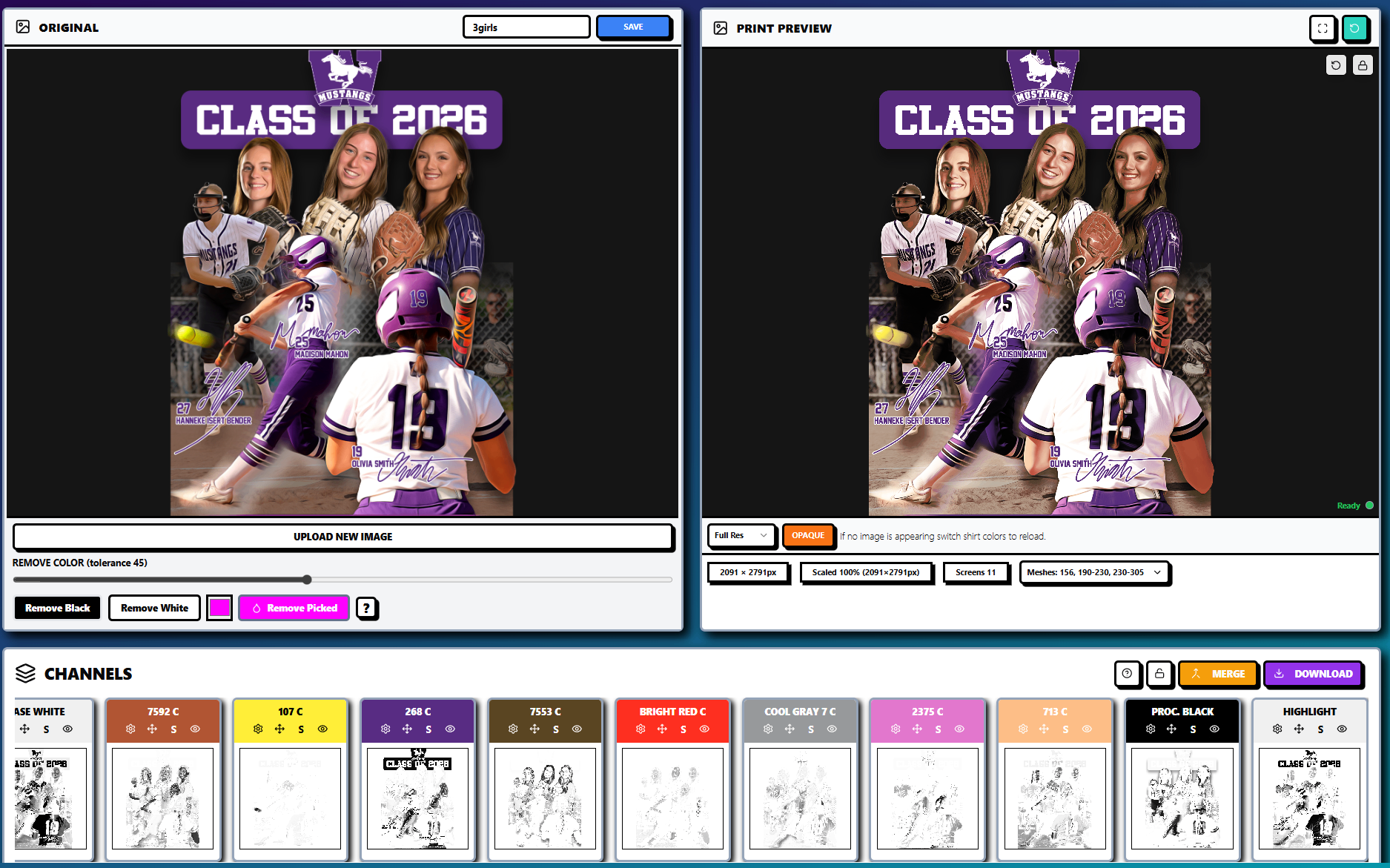
For these jobs, automated separation is critical. InkSplit can analyze the artwork, build the required channels, generate an intelligent underbase, match colors to your ink library, and provide a live print preview before films are output.
Prepress variables: undercolor, white underbase, and halftones
The largest technical difference between the two workflows is how each process handles the garment surface.
On a dark garment, screen printing commonly uses a white underbase beneath the top colors. This undercolor blocks the garment dye and gives spot colors, CMYK inks, or simulated process channels a brighter surface to sit on. However, a full white base beneath every pixel can create an overly heavy print and waste ink.
A smart underbase uses different coverage levels based on the artwork. Shadows may need strong white support, while midtones can use halftones or reduced coverage. Highlights may use little or no underbase, depending on the garment and ink system.
The underbase must also be choked slightly so it does not extend beyond the top-color plates. Without sufficient choke, small registration shifts can produce a visible white halo.
DTF also uses a white layer, but the white underbase is handled digitally as part of the CMYK+W output. The white layer must be dense enough to support color on dark garments while remaining controlled enough to avoid excessive ink deposit, poor powder coverage, or an overly plastic hand.
InkSplit’s smart underbase controls help shops evaluate both approaches visually. You can preview the design on different garment colors and adjust white placement before committing to screens, DTF film, and powder adhesive.
For a deeper technical explanation of garment-dependent base strategies, review InkSplit’s guide to underbase optimization for light and dark garments.
Mesh count and dot gain favor a deliberate screen-print decision
Screen printing introduces physical variables that do not apply to DTF in the same way.
The selected mesh count affects ink deposit, detail, and halftone stability. A lower mesh may be useful for an opaque white underbase or heavier ink deposit. A higher mesh is generally better suited to fine detail and tighter halftones, provided the ink, emulsion, exposure, and press settings support it.
Dot gain must also be considered. During printing, halftone dots can spread as ink is pushed through the mesh and deposited onto fabric. Excessive pressure, incorrect off-contact, unsuitable ink viscosity, or an incompatible squeegee durometer can cause dots to enlarge, plug shadows, and flatten gradients.
This matters most for CMYK and simulated process work. A design that looks straightforward on a monitor may require careful LPI, angle, dot shape, mesh, and press calibration decisions.
DTF removes the mesh-count and screen-registration variables from the image-transfer stage. The DTF printer and RIP control the digital dot structure on the film. That does not eliminate calibration: ink limits, profiles, white ink density, transparency, curing, and powder adhesive still matter: but it changes the type of technical risk involved.

Quantity determines whether setup time can be recovered
Screen printing has a front-loaded cost structure. Preparing screens takes time whether the order contains 12 shirts or 1,200. Once the screens are made and the press is registered, the per-piece cost can fall substantially on a larger run.
DTF has a more flexible setup model. There is no screen exposure or multi-color press setup, so it can be efficient for samples, personalization, short runs, and repeat orders with changing names or artwork.
A practical routing rule is:
Under approximately 50 pieces with complex artwork: evaluate DTF first.
More than approximately 50–100 pieces with simple artwork: evaluate screen printing first.
Variable quantities or personalized designs: consider DTF unless the order can be consolidated into an efficient screen-print production run.
Large repeat orders: screen printing often becomes more competitive, especially with a stable spot-color design.
Your actual break-even point will depend on labor rates, screen costs, film and powder consumption, press speed, garment pricing, and customer expectations. The important point is to include prepress labor in the quote. Manual separations can consume one to three hours on a demanding job, while automated processing can reduce that work to minutes.
Garment type and print feel can override the quantity rule
Garment composition matters because the substrate changes both color appearance and process reliability.
DTF is useful across cotton, polyester, blends, performance garments, and mixed-blank orders. It can simplify jobs where the same artwork must be applied to several garment colors or fabric types.
Screen printing remains especially strong on cotton apparel, where plastisol or water-based inks can deliver the hand feel, wash performance, and production efficiency customers expect. Specialty inks and substrate-specific systems can also make screen printing the better choice for fleece, workwear, and certain non-apparel substrates.
Ask the customer which attribute matters most:
Maximum photographic detail
Softest possible hand
Exact spot-color matching
Consistency across different fabrics
Lowest unit cost at volume
Fastest finished-garment turnaround
That answer may be more important than the nominal number of colors in the artwork.
RIP software is important for both workflows
DTF depends on RIP software to manage CMYK conversion, white ink generation, ink limits, transparency, mirroring, nesting, and film output. But screen printing also benefits from RIP control when the job requires halftones, precise channel output, and repeatable film positives.
InkSplit is not only a RIP. Its primary function is automated color separation for screen printing and DTF preparation. Its built-in RIP extends that separation workflow into production output, particularly for shops that do not already have a preferred RIP method.
That unified approach reduces software handoffs and helps maintain consistent color logic between a screen-printed bulk order and a DTF short-run reorder.

A practical InkSplit routing workflow
Use the following process when a new job enters the art department:
Inspect the artwork. Identify spot colors, gradients, transparency, texture, photographic content, and fine detail.
Confirm quantity. Separate samples, short runs, bulk orders, and personalized pieces.
Check the garment. Note fiber content, garment color, fabric weight, and customer expectations for hand feel.
Preview the underbase. Determine whether the job needs a full, reduced, or selective white underbase.
Compare output paths. Use screen-print channels for spot or simulated process production, or prepare CMYK+W DTF output for digital transfer.
Review production risk. For screen printing, verify mesh count, LPI, dot gain, registration, durometer, and curing requirements. For DTF, verify transparency, white density, film, powder adhesive, and heat-press settings.
Quote the complete workflow. Include prepress labor, consumables, setup, and turnaround: not just ink and garment costs.
InkSplit’s GPU-accelerated engine, ink library matching, smart underbase technology, and live print preview help your team complete this evaluation quickly and consistently.
The best routing decision is the one your shop can repeat
DTF is often the efficient answer for complex artwork, short runs, mixed garments, and rush deadlines. Screen printing is often the stronger answer for high quantities, cotton garments, simple spot-color graphics, and customers prioritizing a soft, durable print.
The common requirement is disciplined prepress. Both workflows depend on accurate color handling, appropriate white ink management, clean transparency, and predictable output.
By using one automated color separation platform for both production paths, your shop can route jobs based on real economics and technical requirements instead of habit. Explore InkSplit’s color separation features, review the DTF and screen-printing prepress strategy, or compare InkSplit pricing plans for your shop’s workflow.
Comments