The Real Cost of Slow Prepress: Calculating the ROI of Automated Color Separation and DTF Prep
- Ariel Chapa

- Aug 11
- 7 min read
For most print shops, prepress is treated as a necessary cost of doing business. Artwork arrives, an operator opens Photoshop or another design application, and the separation process begins.
The problem is not that prepress costs money. The problem is that slow, manual prepress quietly consumes capacity, creates rework, and pushes expensive mistakes onto the production floor.
A complex screen printing separation can take two to three hours when an operator is manually building channels, creating an underbase, adjusting halftones, compensating for dot gain, and preparing transparencies. Add a redo, a misprint, a screen burn, or wasted DTF film, and the real cost of that “free” prepress time becomes significant.
Automated color separation and DTF preparation change the equation. InkSplit can reduce many separation workflows to minutes, with reported savings of one to three hours per job and an average savings of approximately $45 per job.
Here is how to calculate what that can mean for your shop.
The hidden cost of slow screen printing prepress
Manual prepress costs more than the operator’s hourly wage. It affects every stage that follows.
Manual color separation labor
A traditional workflow may require an operator to:
Inspect and clean the artwork
Convert or adjust color modes
Create individual spot-color channels
Build an underbase for dark garments
Apply chokes and spreads
Adjust curves for dot gain compensation
Generate halftones
Export film-ready files
Review each transparency before screen burn
For simple artwork, this may take less than an hour. For photographic designs, gradients, simulated process work, or multi-color illustrations, two to three hours is common.
That time is multiplied by every job requiring a separation. Even when the operator is salaried, those hours are not free. They represent labor that could be used for production support, customer approvals, quality control, or additional orders.
Redoing separations
Manual decisions are difficult to standardize. Two operators may interpret the same artwork differently, particularly when deciding how much information belongs in the underbase or how aggressively to separate a shadow.
A separation may need to be redone because:
The color count is too high for the customer’s budget
The underbase is too heavy or too weak
Halftone transitions look muddy
A spot color does not match the shop’s ink library
The final preview does not match the expected garment appearance
Transparency output does not align with the selected mesh count
Every redo adds labor without creating a billable product.
Re-burning screens after a misprint
A prepress error can remain hidden until the job reaches the press. If a highlight plate is missing, an underbase is improperly choked, or a halftone is output incorrectly, the shop may have to stop production and burn replacement screens.
The cost includes:
New film or transparency output
Emulsion and screen preparation
Screen burn labor
Press setup and registration time
Wasted garments and ink
Delayed orders or rush shipping
The mistake may have originated at a workstation, but the expense appears on the production floor.
DTF film waste
DTF preparation eliminates screen burn, but it does not eliminate prepress risk. A poor white layer, incorrect transparency handling, or oversized design can waste DTF film, ink, and powder adhesive.
Common DTF problems include:
White ink extending beyond the color layer
Weak underbase coverage on dark garments
Excessive powder adhesive coverage
Incorrect scaling or print size
Transparent backgrounds exporting with unwanted artifacts
Halftones or gradients that do not reproduce cleanly
A wasted DTF transfer may cost less than a complete screen re-burn, but repeated waste adds up quickly across short runs and one-off orders.
How automated color separation changes the workflow
InkSplit uses GPU-accelerated processing to analyze artwork, generate color channels, and create a production preview in minutes rather than hours.
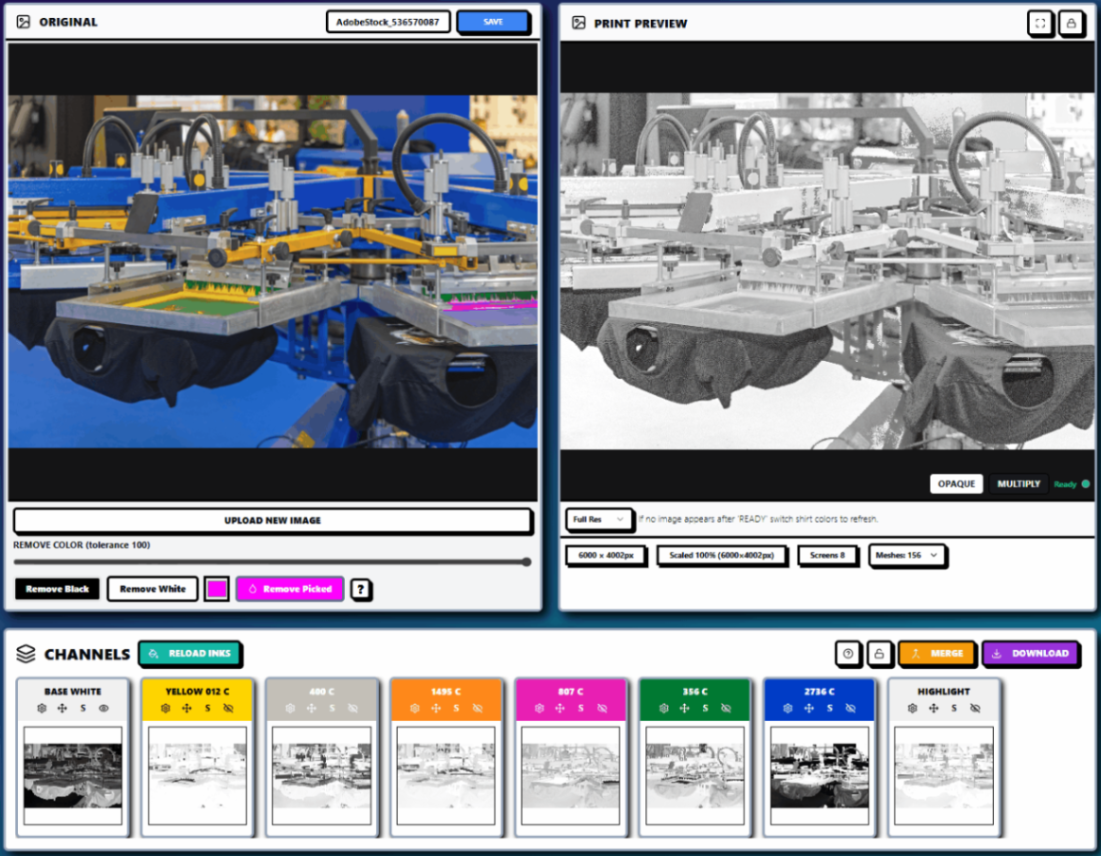
Instead of manually staking out every separation, an operator can upload the artwork, select the garment color and production requirements, and review the result in a live print preview.
The workflow can include:
Automated spot-color and process-color analysis
Smart underbase generation
Channel opacity and layer controls
Color matching synchronized with an ink library
Artwork scaling and trimming
Halftone generation
Export for screen printing transparencies or DTF film preparation
This does not remove the need for experienced print judgment. Mesh count, squeegee durometer, ink deposit, garment color, and press conditions still matter. Automation gives the operator a stronger starting point and a repeatable process for making those decisions.
A practical color separation ROI calculation
Consider an illustrative shop with:
8 jobs per day requiring color separation or DTF preparation
250 production days per year
2,000 total jobs annually
A fully loaded prepress labor rate of $30 per hour
2.5 hours of manual preparation per job
10 minutes of automated preparation per job
Manual screen printing prepress cost
At 2.5 hours per job:
2,000 jobs × 2.5 hours = 5,000 prepress hours
5,000 hours × $30 = $150,000 in annual labor value
With a 10-minute automated workflow:
2,000 jobs × 0.167 hours = approximately 333 hours
333 hours × $30 = approximately $10,000
That releases approximately:
4,667 prepress hours per year
$140,000 in theoretical labor capacity
The word “capacity” matters. You may not reduce payroll immediately. Instead, those hours can be converted into more orders, faster turnaround, fewer overtime hours, or more time for quality control.
Rework and screen burn savings
Now add conservative quality assumptions:
Cost category | Manual workflow | Automated workflow | Annual difference |
Separation rework | 12% of jobs | 4% of jobs | $4,600 saved |
Screen re-burns and misprints | 5% of jobs | 2% of jobs | $5,400 saved |
DTF film and powder waste | $960 | $360 | $600 saved |
These figures assume an average rework cost of $22.50, an average screen-related correction cost of $90, and approximately $12 in DTF film and powder adhesive per wasted job.
Under this model, the measurable annual improvement is approximately:
Labor capacity released: $140,000
Separation rework reduction: $4,600
Screen re-burn and misprint reduction: $5,400
DTF waste reduction: $600
That equals approximately $150,600 in annual operating value before considering additional revenue from accepting more work.
A conservative ROI using the $45-per-job benchmark
To avoid counting the same savings twice, many owners prefer to use a blended per-job figure rather than adding every category separately.
InkSplit’s average reported savings is approximately $45 per job.
At 2,000 jobs per year:
2,000 jobs × $45 = $90,000 in annual savings
For illustration, assume your total annual software and onboarding cost is $6,000. Use your actual quote when building your business case.
The calculation is:
Annual savings: $90,000
Annual automation cost: $6,000
Net annual benefit: $84,000
ROI = ($90,000 − $6,000) ÷ $6,000 × 100
Estimated first-year ROI: 1,400%
The estimated payback period is less than one month at this job volume. Even if your actual savings are substantially lower, the time recovered from manual prepress can still make automation financially meaningful.
For a more precise estimate, track 20 to 50 real jobs and record the time spent on separations, revisions, screen corrections, DTF film waste, and customer-driven changes.
DTF prep and screen printing separation are not identical
DTF and screen printing share several prepress requirements, including high-resolution artwork, transparent backgrounds, accurate sizing, and controlled white ink placement. However, the output requirements differ.
For screen printing, the separation must account for:
Mesh count
Ink deposit and opacity
Squeegee durometer
Registration
Halftone frequency and angle
Dot gain compensation
Film transparency density
Screen burn and exposure conditions
For DTF, the workflow focuses on:
CMYK and white ink channel management
Underbase density
Edge control and choke
DTF film usage
Powder adhesive coverage
Transfer opacity and hand feel
White ink behavior on dark garments
InkSplit’s technical DTF color separation guide explains how these requirements differ while showing where an automated workflow can support both production methods.
One prepress workflow for complex artwork
A major advantage appears when a shop handles detailed illustrations, photographic artwork, gradients, or designs with many spot colors.
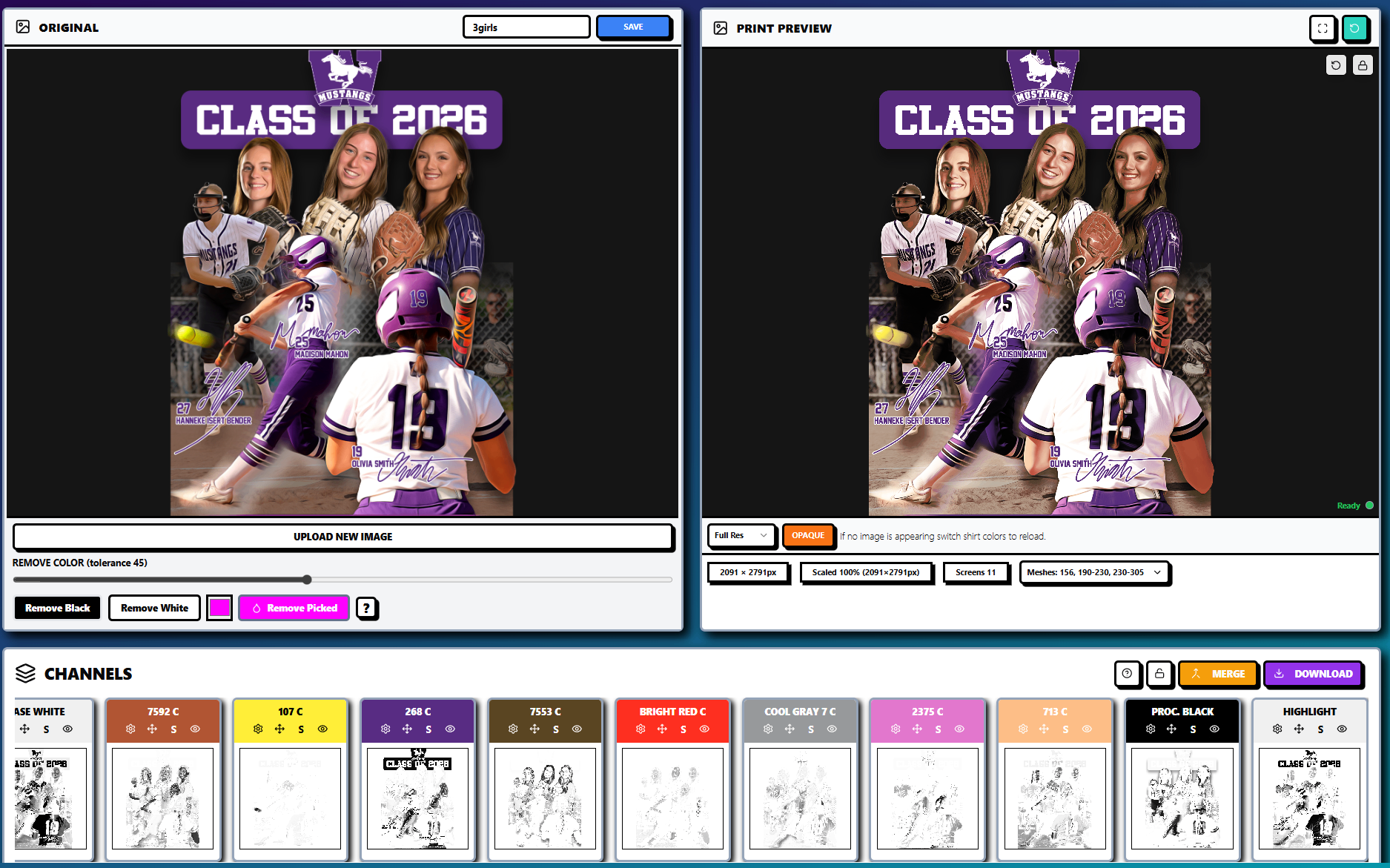
Instead of rebuilding a separation from scratch, operators can adjust channels, modify the underbase, compare garment colors, and review the simulated print before output. This is especially valuable when a design must be adapted for both screen printing and DTF.
Complex artwork should not automatically become a low-margin job. The faster and more consistently you can prepare it, the more confidently you can quote and schedule it.
Halftones, RIP software, and workflow consolidation
Halftone generation is another point where fragmented software workflows create delays. In a traditional setup, an operator may separate artwork in one application, export a file, open separate RIP software, configure dot size and angle, and then prepare the final output.
InkSplit includes a built-in RIP for shops that do not have a preferred RIP method. It can consolidate separation, halftone, preview, and output steps in one workflow.
This should not be viewed as a requirement to replace your preferred RIP software. Shops with established RIP workflows can continue using them where appropriate. The value is flexibility: operators without a dedicated RIP can avoid adding another software purchase, export step, or point of failure.

Learn more about this workflow-consolidation approach in InkSplit’s built-in RIP article.
The bottom line for print shop owners
Slow prepress is not just an inconvenience. It is a recurring operating expense that appears as labor hours, rushed approvals, reworked separations, re-burned screens, wasted transparencies, discarded DTF film, and lost production capacity.
A practical ROI review should measure:
Average manual separation time per job
Automated preparation time per job
Fully loaded prepress labor cost
Separation rework frequency
Screen re-burn and misprint costs
DTF film and powder adhesive waste
Additional jobs your team could accept with the recovered capacity
InkSplit is designed to turn a two- or three-hour separation process into a workflow measured in minutes, while supporting smart underbases, color matching, live print previews, complex artwork, halftones, and optional built-in RIP output.
The clear takeaway is simple: when prepress is the bottleneck, automation pays for more than software. It pays back in recovered time, fewer production mistakes, more predictable quality, and the ability to take on work that would otherwise slow down your shop.
Explore the InkSplit feature suite, review the available plans and pricing, or contact InkSplit to evaluate the potential return for your screen printing and DTF workflow.
Comments