The True Cost of Manual Color Separations: Why Your Shop is Leaving Money on the Table

![[HERO] The True Cost of Manual Color Separations: Why Your Shop is Leaving Money on the Table](https://cdn.mar4blism.com/2Nwc90bfZn7.webp)
Every screen printing shop owner knows the feeling. You just landed a solid 72-piece order with a complex, four-color design. The margins look great on paper. You’ve accounted for the garment cost, the ink, the screens, and the press time. But then, your prepress person disappears into a Photoshop rabbit hole for two and a half hours trying to pull the perfect underbase and trap the colors correctly.
Suddenly, that "profitable" job isn't looking so hot.
In the world of professional screen printing, the most significant leak in your bucket isn't usually wasted ink or misprinted shirts: it’s the time spent before a single drop of ink touches the mesh. Manual color separations are a silent profit killer. While they are often viewed as a "necessary evil" of the craft, the reality is that many shops are hemorrhaging thousands of dollars a year by refusing to modernize this specific part of their workflow.
The Photoshop Time Sink: A Breakdown of the Manual Grind
If you are still separating artwork manually in Photoshop or Illustrator, you are participating in one of the most inefficient processes in modern manufacturing.
Let’s look at what actually happens during those 1 to 3 hours spent on a single manual separation:
Channel Pulling: Identifying the core colors and pulling them into individual alpha channels.
Underbase Creation: Engineering a solid white base that doesn't make the print feel like a bulletproof vest but still provides enough pop.
Choking and Spreading: Manually adjusting the underbase (choking) to ensure no white peaks out, and spreading colors to prevent gaps on the press.
Highlight Whites: Creating a secondary white channel for those crisp details.
Simulated Process Adjustments: Spending 45 minutes just tweaking curves to ensure the "simulated" look actually translates to halftone dots.
This process is tedious, prone to human error, and: most importantly: slow. Even the most skilled "separation wizards" can be derailed by a low-quality file or a client who wants a "small tweak" to the red tones. Every minute spent nudging pixels is a minute your equipment isn't running.

The "Hidden" Hourly Rate: What It Actually Costs You
Most shop owners calculate their prepress costs based on the hourly wage of their artist. If you pay your artist $25/hour and they spend two hours on a separation, the "cost" is $50, right?
Wrong.
The True Hourly Rate of prepress must include the opportunity cost of production. When your primary prepress person is bogged down for three hours on a single job, they aren't just costing you their wage. They are creating a vacuum where:
New jobs aren't being quoted.
Screens aren't being burned for the next shift.
The automatic press sits idle for 30 minutes because the films weren't ready on time.
If your shop generates an average of $300 in revenue per hour of press time, every hour of prepress delay is a massive hit to your top line. When you factor in labor, overhead, and missed production opportunities, that "free" manual separation actually costs your business closer to $100–$150 in lost potential.
The $45/Job Math: The ROI of Automation
When we talk about switching from manual separations to InkSplit’s automated process, we aren't just talking about convenience. We’re talking about cold, hard cash.
Let’s do the math based on an average mid-sized shop:
Manual Separation Cost: 2 hours of labor at $25/hr = $50.00.
InkSplit Automated Cost: 2 minutes of processing time + software subscription cost (pennies per job) = ~$5.00.
That is a $45.00 savings per job.
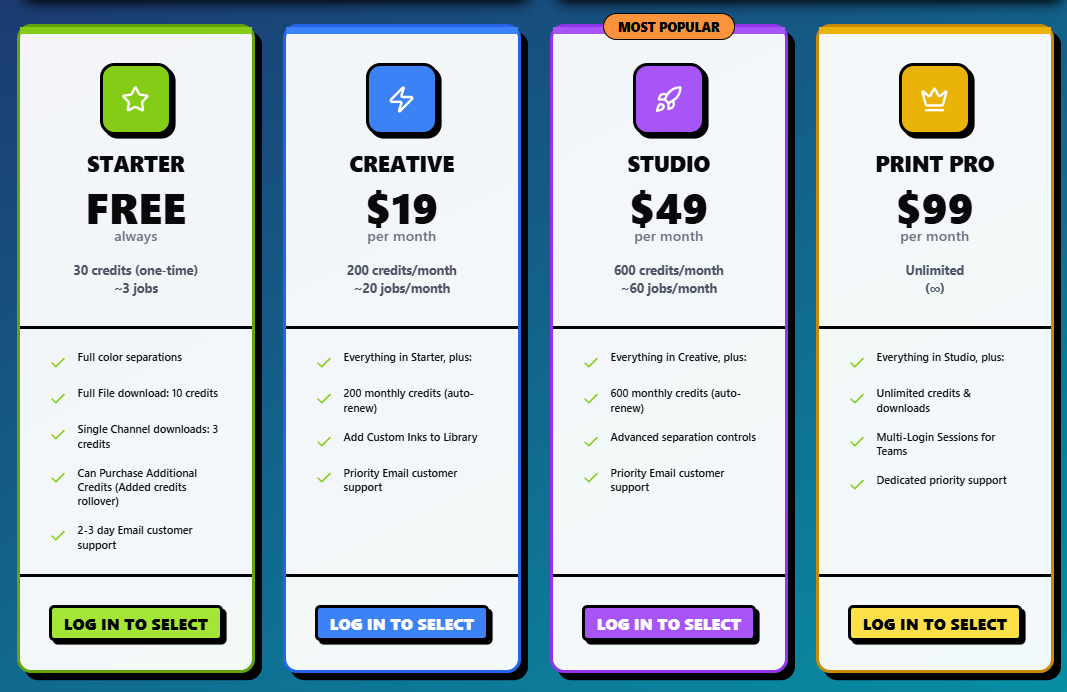
If your shop handles just 10 complex separations a month, you’re saving $450. If you’re doing 50 a month? That’s $2,250 back in your pocket. That is more than enough to cover the Print Pro pricing plan several times over. By automating, you aren't just saving time; you are creating a new profit center within your prepress department.

Eliminating the Prepress Bottleneck
Ask any shop manager where the "pinch point" is, and 90% of them will point to the art department. The press can only print as fast as the screens are provided. The screens can only be burned as fast as the films are printed. The films can only be printed as fast as the separations are finished.
Prepress is the narrow neck of the bottle. When you use manual methods, the neck is tiny. One complex job can stop the entire flow of the shop.
Automation through InkSplit clears that path. By turning a two-hour task into a two-minute task, you effectively remove the bottleneck. Your artist can now process 20 jobs in the time it used to take to do one. This allows the screen room to stay ahead of the schedule, ensuring the presses never stop spinning. Check out how we compare against other tools in our Top 5 Color Separation Software Suites ranking.
Consistency is Profit: Reducing Misprints and Re-burns
The "True Cost" of manual separations often shows up later: on the press. Manual separations are subjective. One day your artist might choke the underbase by 1 pixel; the next day, they might do 2 pixels. If the separation isn't consistent, the setup on the press takes longer.
Even worse are the "re-burns." We’ve all been there: the job is on the press, the first test print looks muddy, and you realize the magenta channel was pulled incorrectly. You have to break down the screen, go back to Photoshop, re-separate, re-print film, and re-burn the screen.
A single re-burn can cost a shop $100+ in materials and lost press time.
InkSplit’s AI-driven separations provide a level of consistency that human eyes simply can't match at scale. Because the software uses proven algorithms to calculate underbases and color pulls, the results are predictable. Predictable separations lead to faster setups and a massive reduction in expensive mid-production errors. You can even compare 8 different preset color strategies instantly to find the perfect approach for your specific mesh counts.

Scalability: Growing Without the Hiring Headache
One of the biggest challenges in the screen printing industry today is finding skilled labor. Finding a "separation expert" who knows how to handle complex simulated process work is like finding a needle in a haystack: and they aren't cheap.
If your shop is growing, you eventually hit a wall where you need another artist just to keep up with the separations. But adding another $50k–$60k salary plus benefits to your overhead is a massive risk.
Automation allows you to scale your production volume without scaling your headcount. Instead of hiring a second or third artist, your current team can handle 5x the volume because the "heavy lifting" of the separations is being handled by InkSplit. This allows you to take on more complex, high-margin work that you might have previously turned away because "the art would take too long."
Stop Leaving Money on the Table
In an industry where margins are constantly being squeezed by rising garment prices and shipping costs, you have to find efficiency wherever you can. Continuing to do manual color separations in 2026 is like trying to run a shop without an automatic press: it’s possible, but it’s holding you back from your true potential.
The math is clear. The time savings are undeniable. The reduction in errors is a direct boost to your bottom line.
Every day you wait to automate your prepress workflow is another day you are leaving $45 per job on the table. It’s time to stop the "Photoshop grind" and start focusing on what really matters: growing your business and delivering incredible prints to your customers.
Ready to reclaim your time and your profits?
Comments